
Professional Operator Protocol
To maintain the consistency of the MP Lab Architecture, every session must begin with a systematic calibration. Like any high-output instrument, the “Money Printer” requires the trader to verify the environment before engaging the gears.
Phase 1: Environmental Analysis (The “Why”)
Before enabling any automation, the pilot must define the Market Regime.
- Macro Calendar Check: Identify high-impact news (CPI, FOMC, NFP). The strategy should generally be disabled or tightened 15 minutes before/after these prints.
- HTF Trend Alignment: Determine the Higher Time Frame bias (4H/Daily). Are we trading with the trend or looking for mean reversion at extremes? Take advantage of the ability to only slightly favor longs example instead of completely shutting down shorts by allowing a wider take profit on longs.
- Volatility Assessment: Check the VIX or ATR. Ensure your Stop Loss and Take Profit parameters are calibrated for the current day’s range.
Phase 2: Technical Hardening (The “When”)
- Indicator Verification: Ensure your MP Entry and Level Indicators are loaded.
- If using CSV or other imported levels: Verify that the “Levels” on your chart are current for today’s date.
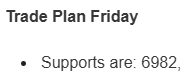
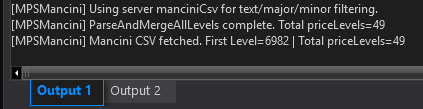
- Mancini Subscriber Only: Ensure first level to trade in NinjaScript Output matches the level in the Discord Daily
Phase 3: Systems Readiness (The “Execution”)
- Broker Connection: Confirm a “Green” connection status in NinjaTrader 8.
- Account Selection: Double-check that the strategy is pointed at your Live or Apex/Prop account, not a Sim account (unless testing).
- Strategy Enablement: * Right-click Chart > Strategies.
- Ensure the strategy is enabled
- Visual De-Noising: Apply the “Clean Chart Protocol.” Remove any unnecessary labels or legacy drawings that could distract from the institutional intent.
- Ensure MP Trade Copier is enabled with the correct accounts/template
Phase 4: Active Monitoring (The “Maintenance”)
- The “Fixed Scale” Check: If you manually moved the chart, press the ‘F’ button to reset the scale so you don’t miss the visual execution of an entry.
- Trade Management: Verify that the Strategy’s “Auto-Trail” or “Level-to-Level” Exit logic is active.
- The Kill Switch: Know exactly where your “Close All” button is located in case of unexpected black-swan volatility.
Operator Note: Success in systematic trading is 50% the algorithm and 50% the Pilot’s discipline in following this calibration. If you haven’t completed this checklist, the “Money Printer” stays off.